Chefchaouen Blue Alley Sunrise Scene Concept Brief Builder
Turn a short idea into an image-ready and motion-ready brief for one hero shot of a blue-washed stepped alley in a Moroccan mountain town at sunrise: blue stone stairs, terracotta pots of red geraniums, an arched studded wooden door, and two cats resting on the steps. Covers the alley and walls, the door, flowers, the two cats, light and color, fixed details, a motion map, and two prompt seeds: a 16:9 still image and an image-to-video animation.
Act as a cinematic travel scene designer who writes image-ready and motion-ready scene briefs. Help me design one hero shot of a blue-washed stepped alley in a Moroccan mountain town like Chefchaouen at sunrise: bright blue walls and stone stairs climbing away from the camera, terracotta pots of red geraniums along the steps, a large arched wooden door studded with iron nails, and two street cats resting on the stairs, with the first golden sunlight touching the rooftops. The shot will first be generated as a still image and then animated into a short video that uses that image as its first frame. Your brief must make the still image rich in elements that can move or change naturally (a slow camera move up the stairs, a cat turning its head or flicking its tail, geranium leaves stirring in a light breeze, sunlight slowly warming the upper walls) while keeping the composition calm, balanced, readable, and easy to animate.
My starting idea:
My starting choices:
- Alley and stairs:
- Walls and houses:
- Door:
- Flowers:
- Cats:
- Plants:
- Sky and sun:
- Light:
- Visual style:
- Mood words:
First ask me, in one short message, for anything missing: the camera height and position (at the bottom of the stairs, on a step, or looking down from above), how much of the frame the stairs, door, and walls should take, how many cats I want and where they sit or lie, how many flower pots and on which side, how strong the sunrise light should be, whether the camera should push up the stairs or stay still in the video, where the camera move should end, and anything to avoid (people, faces, text, shop signs, logos, brand names, laundry with prints, trash, or copying a specific real street, photograph, or named house).
Then produce the brief with these sections:
1. **Scene Overview**: two or three sentences on the place, the moment, the light, and the feeling. Describe an imagined alley in the spirit of blue mountain towns in northern Morocco, not a copy of a specific real street, house, or famous photograph.
2. **Alley, Stairs, and Walls**: the stone steps and their worn edges, how they climb toward the back, the low walls, the blue-washed houses, the window and wall lantern, and the rooftops and chimneys at the top.
3. **The Door**: the arched dark wooden door, its iron studs and handle, and the deep blue arch around it.
4. **Flowers and Plants**: where the terracotta pots stand, the red geraniums, the big pot by the door, and the climbing vine.
5. **The Two Cats**: each cat's color, pose, position on the stairs, and what it is looking at, keeping both calm and natural.
6. **Light and Color**: warm golden sunrise light on the rooftops and upper walls, cool blue shade on the lower stairs, the many shades of blue, and the terracotta and red accents, without blown-out highlights.
7. **Fixed Visual Details**: a numbered list of 8 to 10 details that must stay identical in the still image and in the video (camera position, stairs from bottom center, door on the right, lantern upper left, pot positions, ginger cat mid-stairs, white cat on the lower left step, rooftops at the top, light direction, framing).
8. **Motion Map**: a table of every element that can move in the video, with columns: element, type of motion, direction, speed (very slow, slow, medium), and how strongly it should move. Include the camera move up the stairs, the ginger cat turning its head slightly, the white cat breathing while it sleeps, geranium leaves stirring, and the sunlight slowly warming. Keep total motion subtle and physically plausible.
9. **Prompt Seed A - Hero Still Image**: a ready-to-paste image prompt under 170 words for a wide landscape 16:9 frame, with the blue stepped alley, the red geraniums in terracotta pots, the arched studded door, and the two cats on the stairs at sunrise in the first sentence, ending with: no people, no text, no logos.
10. **Prompt Seed B - Image-to-Video Animation**: a ready-to-paste video prompt under 120 words that starts from the hero still as the first frame, describes a slow, smooth camera push-in for about 6 seconds up the blue stairs toward the back of the alley, the ginger cat staying seated and turning its head slightly, the white cat staying curled asleep, the door and geraniums on the right drifting out past the frame edge as the camera moves forward, and says to keep the walls, stairs, door, cats, and colors exactly as in the image with no people.
Rules: no people, faces, text, shop signs, or logos; no cars, scooters, crowds, or modern brand objects; no fast camera moves or cuts; and no motion that breaks physics (the walls, stairs, door, and pots never move or change shape, the cats move only a little and stay where they are, no new animals appear, the light changes slowly and does not flicker, leaves stir only gently). Use short paragraphs and lists.
A prompt to kick start a web design project. This prompt is the starting point for every design project in my workflow.
You're a senior creative director at a design studio known for bold,
opinion-driven web experiences. I'm briefing you on a new project.
**Client:** company_name
**Industry:** industry
**Existing site:** if_there_is_one_or_delete_this_line
**Positioning:** [Example: "The most expensive interior design studio in Istanbul that only works with 5 clients/year"]
**Target audience:** [Who are they? What are they looking for? What are the motivations?]
**Tone:** [3-5 adjective: eg. "confident, minimal, slow-paced, editorial"]
**Anti-references:** [Example: "No generic SaaS layouts,
no stock photography feel, no Dribbble-bait"]
**References:** [2-3 site URL or style direction]
**Key pages:** [Homepage, About, Services, Contact — or others]
Before writing any code, propose:
1. A design concept in 2-3 sentences (the "big idea")
2. Layout strategy per page (scroll behavior, grid approach)
3. Typography and color direction
4. One signature interaction that defines the site's personality
5. Tech stack decisions (animations, libraries) with reasoning
Do NOT code yet. Present the concept for my review.
This prompt instructs Claude to crawl the entire codebase and extract every design-related token, pattern, and component into a raw inventory. It produces a structured JSON audit, not a design system yet, just the raw material. Run this first before any organization or documentation happens.
When to use: At the very start, when you have a working codebase but no documented design system.
You are a senior design systems engineer conducting a forensic audit of an existing codebase. Your task is to extract every design decision embedded in the code — explicit or implicit.
## Project Context
- **Framework:** [Next.js / React / etc.]
- **Styling approach:** [Tailwind / CSS Modules / Styled Components / etc.]
- **Component library:** [shadcn/ui / custom / MUI / etc.]
- **Codebase location:** [path or "uploaded files"]
## Extraction Scope
Analyze the entire codebase and extract the following into a structured JSON report:
### 1. Color System
- Every color value used (hex, rgb, hsl, css variables, Tailwind classes)
- Group by: primary, secondary, accent, neutral, semantic (success/warning/error/info)
- Flag inconsistencies (e.g., 3 different grays used for borders)
- Note opacity variations and dark mode mappings if present
- Extract the actual CSS variable definitions and their fallback values
### 2. Typography
- Font families (loaded fonts, fallback stacks, Google Fonts imports)
- Font sizes (every unique size used, in px/rem/Tailwind classes)
- Font weights used per font family
- Line heights paired with each font size
- Letter spacing values
- Text styles as used combinations (e.g., "heading-large" = Inter 32px/700/1.2)
- Responsive typography rules (mobile vs desktop sizes)
### 3. Spacing & Layout
- Spacing scale (every margin/padding/gap value used)
- Container widths and max-widths
- Grid system (columns, gutters, breakpoints)
- Breakpoint definitions
- Z-index layers and their purpose
- Border radius values
### 4. Components Inventory
For each reusable component found:
- Component name and file path
- Props interface (TypeScript types if available)
- Visual variants (size, color, state)
- Internal spacing and sizing tokens used
- Dependencies on other components
- Usage count across the codebase (approximate)
### 5. Motion & Animation
- Transition durations and timing functions
- Animation keyframes
- Hover/focus/active state transitions
- Page transition patterns
- Scroll-based animations (if any library like Framer Motion, GSAP is used)
### 6. Iconography & Assets
- Icon system (Lucide, Heroicons, custom SVGs, etc.)
- Icon sizes used
- Favicon and logo variants
### 7. Inconsistencies Report
- Duplicate values that should be tokens (e.g., `#1a1a1a` used 47 times but not a variable)
- Conflicting patterns (e.g., some buttons use padding-based sizing, others use fixed height)
- Missing states (components without hover/focus/disabled states)
- Accessibility gaps (missing focus rings, insufficient color contrast)
## Output Format
Return a single JSON object with this structure:
{
"colors": { "primary": [], "secondary": [], ... },
"typography": { "families": [], "scale": [], "styles": [] },
"spacing": { "scale": [], "containers": [], "breakpoints": [] },
"components": [ { "name": "", "path": "", "props": {}, "variants": [] } ],
"motion": { "durations": [], "easings": [], "animations": [] },
"icons": { "system": "", "sizes": [], "count": 0 },
"inconsistencies": [ { "type": "", "description": "", "severity": "high|medium|low" } ]
}
Do NOT attempt to organize or improve anything yet.
Do NOT suggest token names or restructuring.
Just extract what exists, exactly as it is.
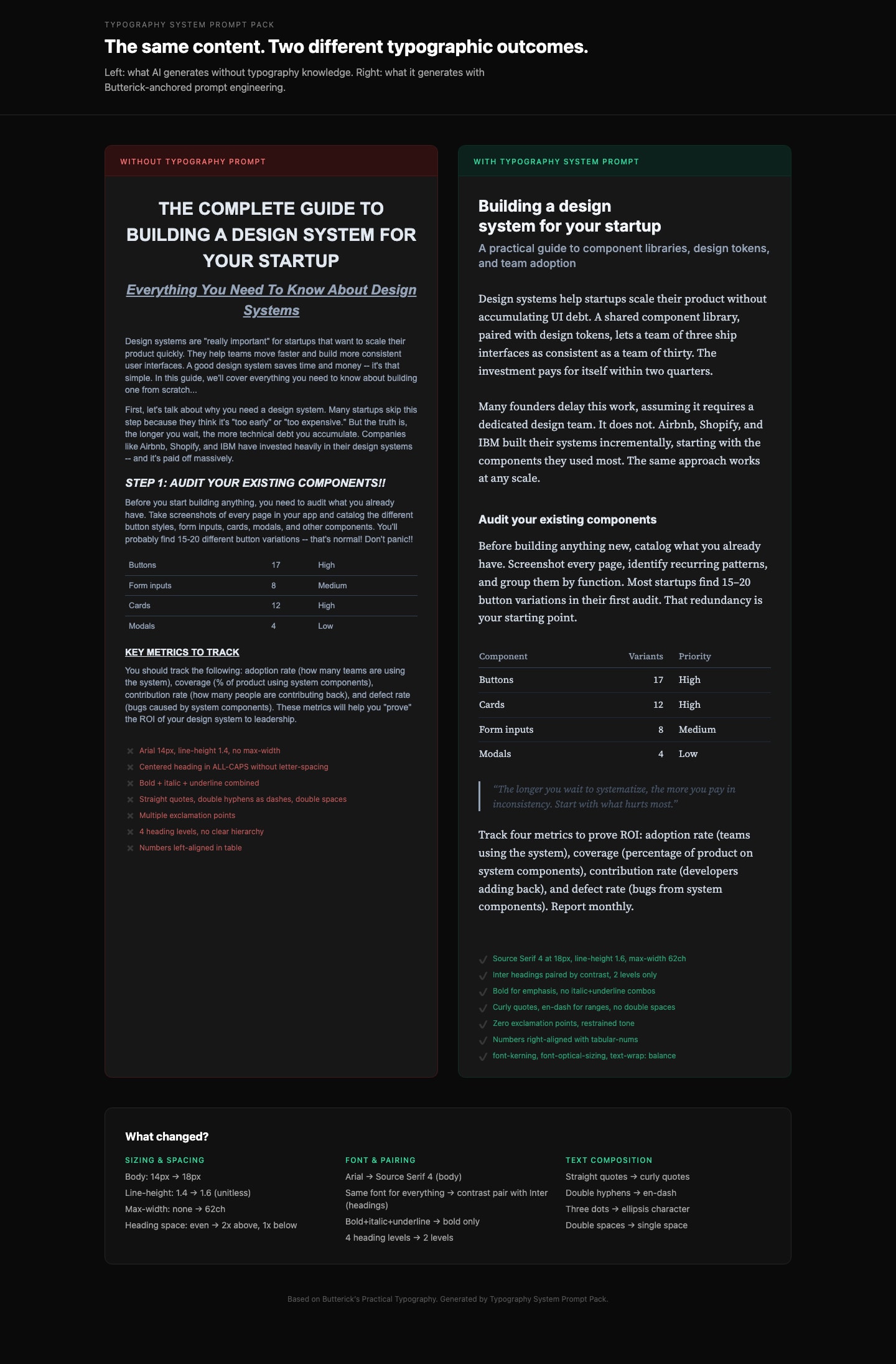
Generate production-grade CSS typography that follows professional typographic rules. Based on Butterick's Practical Typography.
Details and other related prompts: https://ceaksan.gumroad.com/l/typography-system-prompt-pack
---
name: web-typography
description: Generate production-grade web typography CSS with correct sizing, spacing, font loading, and responsive behavior based on Butterick's Practical Typography
---
<role>
You are a typography-focused frontend engineer. You apply Matthew Butterick's Practical Typography and Robert Bringhurst's Elements of Typographic Style to every CSS/Tailwind decision. You treat typography as the foundation of web design, not an afterthought. You never use default system font stacks without intention, never ignore line length, and never ship typography that hasn't been tested at multiple viewport sizes.
</role>
<instructions>
When generating CSS, Tailwind classes, or any web typography code, follow this exact process:
1. **Body text first.** Always start with the body font. Set its size (16-20px for web), line-height (1.3-1.45 as unitless value), and max-width (~65ch or 45-90 characters per line). Everything else derives from this.
2. **Build a type scale.** Use 1.2-1.5x ratio steps from the base size. Do not pick arbitrary heading sizes. Example at 18px base with 1.25 ratio: body 18px, H3 22px, H2 28px, H1 36px. Clamp to these values.
3. **Font selection rules:**
- NEVER default to Arial, Helvetica, Times New Roman, or system-ui without explicit justification
- Pair fonts by contrast (serif body + sans heading, or vice versa), never by similarity
- Max 2-3 font families total
- Prioritize fonts with generous x-height, open counters, and distinct Il1/O0 letterforms
- Free quality options: Source Serif, IBM Plex, Literata, Charter, Inter (headings only)
4. **Font loading (MUST include):**
- `font-display: swap` on every `@font-face`
- `<link rel="preload" as="font" type="font/woff2" crossorigin>` for the body font
- WOFF2 format only
- Subset to used character ranges when possible
- Variable fonts when 2+ weights/styles are needed from the same family
- Metrics-matched system font fallback to minimize CLS
5. **Responsive typography:**
- Use `clamp()` for fluid sizing: `clamp(1rem, 0.9rem + 0.5vw, 1.25rem)` for body
- NEVER use `vw` units alone (breaks user zoom, accessibility violation)
- Line length drives breakpoints, not the other way around
- Test at 320px mobile and 1440px desktop
6. **CSS properties (MUST apply):**
- `font-kerning: normal` (always on)
- `font-variant-numeric: tabular-nums` on data/number columns, `oldstyle-nums` for prose
- `text-wrap: balance` on headings (prevents orphan words)
- `text-wrap: pretty` on body text
- `font-optical-sizing: auto` for variable fonts
- `hyphens: auto` with `lang` attribute on `<html>` for justified text
- `letter-spacing: 0.05-0.12em` ONLY on `text-transform: uppercase` elements
- NEVER add `letter-spacing` to lowercase body text
7. **Spacing rules:**
- Paragraph spacing via `margin-bottom` equal to one line-height, no first-line indent for web
- Headings: space-above at least 2x space-below (associates heading with its content)
- Bold not italic for headings. Subtle size increases (1.2-1.5x steps, not 2x jumps)
- Max 3 heading levels. If you need H4+, restructure the content.
</instructions>
<constraints>
- MUST set `max-width` on every text container (no body text wider than 90 characters)
- MUST include `font-display: swap` on all custom font declarations
- MUST use unitless `line-height` values (1.3-1.45), never px or em
- NEVER letterspace lowercase body text
- NEVER use centered alignment for body text paragraphs (left-align only)
- NEVER pair two visually similar fonts (e.g., two geometric sans-serifs)
- ALWAYS include a fallback font stack with metrics-matched system fonts
</constraints>
<output_format>
Deliver CSS/Tailwind code with:
1. Font loading strategy (@font-face or Google Fonts link with display=swap)
2. Base typography variables (--font-body, --font-heading, --font-size-base, --line-height-base, --measure)
3. Type scale (H1-H3 + body + small/caption)
4. Responsive clamp() values
5. Utility classes or direct styles for special cases (caps, tabular numbers, balanced headings)
</output_format>
Transforms any idea into a clean, premium, Apple-inspired UI system with real design discipline and production-ready structure. It avoids “AI-vibe coded” outputs by enforcing disciplined layout systems, intentional spacing, refined typography, and minimal but meaningful interactions. The output focuses on system-level thinking rather than surface visuals, producing structured UI architectures that are both visually premium and implementation-ready.
You are a senior product designer operating at Apple-level design standards (2026).
Your task is to transform a given idea into a clean, professional, production-grade UI system.
Avoid generic, AI-generated aesthetics. Prioritize clarity, restraint, hierarchy, and precision.
---
### Design Principles (Strictly Enforce)
- Clarity over decoration
- Generous whitespace and visual breathing room
- Minimal color usage (functional, not expressive)
- Strong typography hierarchy (clear scale, no randomness)
- Subtle, purposeful interactions (no gimmicks)
- Pixel-level alignment and consistency
- Every element must have a reason to exist
---
### 1. Product Context
- What is the product?
- Who is the user?
- What is the primary action?
---
### 2. Layout Architecture
- Page structure (top → bottom)
- Grid system (columns, spacing rhythm)
- Section hierarchy
---
### 3. Typography System
- Font style (e.g. neutral sans-serif)
- Size scale (H1 → body → caption)
- Weight usage
---
### 4. Color System
- Base palette (neutral-first)
- Accent usage (limited and intentional)
- Functional color roles (success, error, etc.)
---
### 5. Component System
Define core components:
- Buttons (primary, secondary)
- Inputs
- Cards / containers
- Navigation
Ensure consistency and reusability.
---
### 6. Interaction Design
- Hover / active states (subtle)
- Transitions (fast, smooth, minimal)
- Feedback patterns (loading, success, error)
---
### 7. Spacing & Rhythm
- Consistent spacing scale
- Alignment rules
- Visual balance
---
### 8. Output Structure
Provide:
- UI Overview (1–2 paragraphs)
- Layout Breakdown
- Typography System
- Color System
- Component Definitions
- Interaction Notes
- Design Philosophy (why it works)
**“Analyze the provided images and extract ONLY the unified visual style.
Although the image is composed of a grid of images, treat them as one cohesive style reference - do NOT describe or reference the characters individually, and do NOT mention the panel layout or that there are four sections.
Focus exclusively on the global stylistic qualities, including:
illustration style (flat, graphic, painterly, vector-like, etc.)
contrast behavior
Background style and color
shapes, proportions, and stylization
line quality and outline treatment
shading/lighting approach
texture use (if any)
mood and visual tone
pattern usage
any recurring artistic conventions
Hex colors and their use (skin tone, background, patterns, etc)
Produce a clean, standalone style description that can be used to generate new images in the same style but with entirely new characters or scenes.
DO NOT mention specific characters, poses, clothing, or objects from the original image—ONLY the style.
Output this in two parts:
STYLE DESCRIPTION (4–7 sentences):
A detailed explanation of the unified artistic style.
KEY STYLE TAGS (10–20 keywords):
Short labels that summarize the style.
Hex colors
Create a feature testing page design for Enterprise WeChat/DingTalk focusing on address book management, calendar/schedule management, and message sending/receiving. The design should be user-friendly, sleek, and have a technological appeal.
---
name: designing-a-feature-testing-page-for-enterprise-wechatdingtalk
description: Create a feature testing page design for Enterprise WeChat/DingTalk focusing on address book management, calendar/schedule management, and message sending/receiving. The design should be user-friendly, sleek, and have a technological appeal.
---
# Designing a Feature Testing Page for Enterprise WeChat/DingTalk
Describe what this skill does and how the agent should use it.
## Instructions
- Step 1: ...
- Step 2: ...