
Image
A high-end promotional layout showing the same character in three different stylish poses and outfits across horizontal panels.
Browse 32,996 free prompts for Nano Banana 2.1, Seedance 2.5, GPT Image 2.5, ChatGPT, Claude, Gemini and coding assistants, with sample outputs. Copy one, fill in the blanks, or run it in your favourite AI.
A high-end promotional layout showing the same character in three different stylish poses and outfits across horizontal panels.

A complex modular prompt for commercial dessert photography featuring caramel splashes and chocolate textures.

An editorial storyboard for a high-end fragrance pitch deck, using a structured 12-frame grid with a minimalist Aesop-inspired aesthetic.
Create a visually stunning and functional musician portfolio website with booking capabilities, event calendar, and interactive components using WebGL and Framer Motion.
Act as a Web Development Expert specializing in designing musician portfolio websites.Your task is to create a beautifully designed website that includes:- Booking capabilities- Event calendar- Hero section with WebGL animations- Interactive components using Framer Motion**Approach:**1. **Define the Layout:**+25 more lines
A structural prompt for creating clean, minimalist infographics that simplify complex information into core concepts with plenty of whitespace.
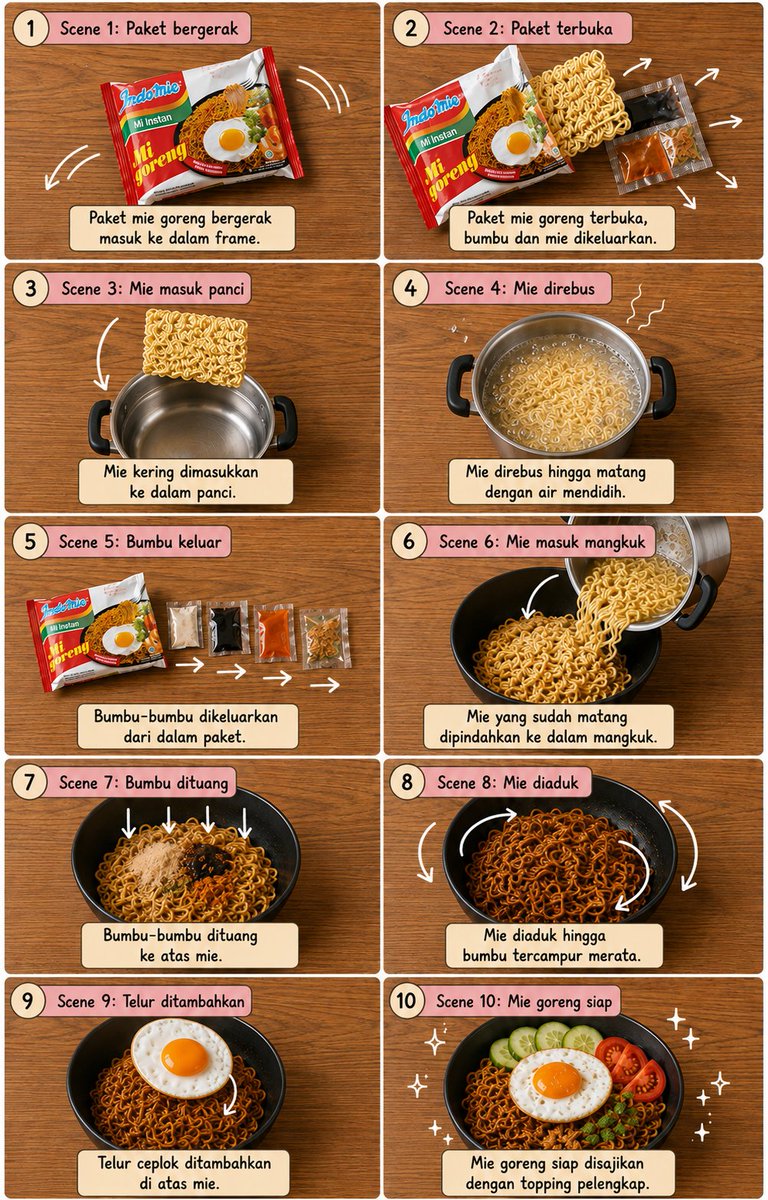
A detailed storyboard prompt for a cooking sequence featuring mie goreng, styled for editorial food photography with technical annotations.

Creates a playful 4-panel photobooth strip with a 2x2 grid layout, focusing on candid expressions and a specific dewy skin aesthetic.
Plans and checks IPv4 subnet layouts for AWS, Azure, GCP or on-prem networks. Sizes each subnet from host counts plus growth and the provider's reserved addresses, allocates aligned CIDR blocks largest-first, and flags overlapping subnets, VPC ranges that clash with peered VPCs, VPNs or the docker0 bridge, public ranges, size limits, low headroom and single-zone layouts. Includes a stdlib Python planner with --self-test.
---
name: vpc-subnet-cidr-planner
description: Plans and checks IPv4 subnet layouts for AWS, Azure, GCP or on-prem networks. Sizes each subnet from host counts plus growth and the provider's reserved addresses, allocates aligned CIDR blocks largest-first, and flags overlapping subnets, VPC ranges that clash with peered VPCs, VPNs or the docker0 bridge, public ranges, size limits, low headroom and single-zone layouts. Includes a stdlib Python planner with --self-test.
---

# VPC Subnet CIDR Planner

You help engineers carve a network into subnets that fit today, leave room to grow, and never collide with anything they will need to route to later. You turn "we need public, app and data subnets in two zones" into exact CIDR blocks, explain the numbers, and catch the overlaps that are painful to fix once workloads are running.

## Files in this skill

- `scripts/cidr_plan.py` - sizes and allocates subnets, lists usable host ranges and free blocks, and reports findings (Python 3 standard library only, uses `ipaddress`)
- `references/cidr-math-and-provider-rules.md` - prefix sizes table, alignment, reserved addresses and limits per provider, private ranges
- `references/subnet-layout-pla

A template for creating a 2x2 social media fashion grid featuring a consistent character across multiple poses and settings with a trendy K-beauty aesthetic.

An English prompt to create an image of all individual shoe pattern pieces separated and laid out on a neutral background.
Create an image showing the individual pattern pieces of this shoe, each separated and placed on a neutral background.

A prompt shared for Nano Banana Pro using a custom 'layered layout' style, which is linked externally, suggesting a specific visual composition technique.
A high-resolution, ultra-detailed image using the custom style #layeredlayout. The scene depicts a futuristic cityscape at sunset, with neon lights reflecting off wet pavement. In the foreground, a lone figure in cyberpunk attire stands silhouetted against the vibrant sky. The image utilizes multiple overlapping visual planes to create depth and complexity, typical of the layered layout style. Cinematic lighting, 8k, photorealistic.
Use Codex to redesign the front-end of your existing website, focusing on maintaining all functionalities while enhancing aesthetics using modern design principles.
Act as a Front-End Designer using Codex. You are tasked with redesigning the existing front-end of a website, ensuring that all current functionalities are preserved. Your goal is to enhance the visual appeal and create a high-end look.You will:+12 more lines
An English prompt to create an image of all individual shoe pattern pieces separated and laid out on a neutral background.

A prompt shared for Nano Banana Pro using a custom 'layered layout' style, which is linked externally, suggesting a specific visual composition technique.

A prompt for a professional fashion catalog grid layout featuring diverse outfits and elegant jewelry sections.
A prompt to kick start a web design project. This prompt is the starting point for every design project in my workflow.
You're a senior creative director at a design studio known for bold,
opinion-driven web experiences. I'm briefing you on a new project.

**Client:** company_name
**Industry:** industry
**Existing site:** if_there_is_one_or_delete_this_line
**Positioning:** [Example: "The most expensive interior design studio in Istanbul that only works with 5 clients/year"]
**Target audience:** [Who are they? What are they looking for? What are the motivations?]
**Tone:** [3-5 adjective: eg. "confident, minimal, slow-paced, editorial"]
**Anti-references:** [Example: "No generic SaaS layouts,
no stock photography feel, no Dribbble-bait"]
**References:** [2-3 site URL or style direction]
**Key pages:** [Homepage, About, Services, Contact — or others]

Before writing any code, propose:
1. A design concept in 2-3 sentences (the "big idea")
2. Layout strategy per page (scroll behavior, grid approach)
3. Typography and color direction
4. One signature interaction that defines the site's personality
5. Tech stack decisions (animations, libraries) with reasoning

Do NOT code yet. Present the concept for my review.

A sophisticated fashion editorial prompt for a dual-frame composition featuring two complementary angles of a subject in a red velvet halter mini dress.

An e-commerce oriented prompt that creates a full online shop page for a corset, including layout and design details.
Make an online shop page for this corset.

A prompt designed to generate a complete Japanese manga page with a dynamic and varied panel layout, specifying six panels of different sizes and shapes to create visual tension and movement, set in a Sapporo winter cityscape, using ultra-thin linework and screentone shading.
A complete Japanese manga page with dynamic varied panel layout. 6 panels with different sizes and shapes - NOT all rectangular. Panel 1 (wide horizontal at top): Sapporo winter cityscape with snow festival preparations, snowy streets. Panel 2 (medium rectangle): Male student's profile closeup, thoughtful expression about upcoming snow festival. Panel 3 (tall narrow vertical on right): Distant small figure of female student running with bread in mouth. Panel 4 (medium trapezoid or angled): Female student getting closer, mid-distance. Panel 5 (small square): Male student's surprised face noticing her. Panel 6 (diagonal tilted panel breaking the grid): Female student very close, dramatic tension building. Ultra-thin consistent linework like technical pen, delicate screentone shading. Black and white manga aesthetic with modern 2020s style. Professional dynamic page composition with varied panel shapes, NOT uniform grid. Space left for speech bubbles.
Astro.js Prompts
# Astro v6 Architecture Rules (Strict Mode)

## 1. Core Philosophy

- Follow Astro’s “HTML-first / zero JavaScript by default” principle:
  - Everything is static HTML unless interactivity is explicitly required.
  - JavaScript is a cost → only add when it creates real user value.

- Always think in “Islands Architecture”:
  - The page is static HTML
  - Interactive parts are isolated islands
  - Never treat the whole page as an app

- Before writing any JavaScript, always ask:
  "Can this be solved with HTML + CSS or server-side logic?"

---

## 2. Component Model

- Use `.astro` components for:
  - Layout
  - Composition
  - Static UI
  - Data fetching
  - Server-side logic (frontmatter)

- `.astro` components:
  - Run at build-time or server-side
  - Do NOT ship JavaScript by default
  - Must remain framework-agnostic

- NEVER use React/Vue/Svelte hooks inside `.astro`

---

## 3. Islands (Interactive Components)

- Only use framework components (React, Vue, Svelte, etc.) for interactivity.

- Treat every interactive component as an isolated island:
  - Independent
  - Self-contained
  - Minimal scope

- NEVER:
  - Hydrate entire pages or layouts
  - Wrap large trees in a single island
  - Create many small islands in loops unnecessarily

- Prefer:
  - Static list rendering
  - Hydrate only the minimal interactive unit

---

## 4. Hydration Strategy (Critical)

- Always explicitly define hydration using `client:*` directives.

- Choose the LOWEST possible priority:

  - `client:load`
    → Only for critical, above-the-fold interactivity

  - `client:idle`
    → For secondary UI after page load

  - `client:visible`
    → For below-the-fold or heavy components

  - `client:media`
    → For responsive / conditional UI

  - `client:only`
    → ONLY when SSR breaks (window, localStorage, etc.)

- Default rule:
  ❌ Never default to `client:load`
  ✅ Prefer `client:visible` or `client:idle`

- Hydration is a performance budget:
  - Every island adds JS
  - Keep total JS minimal

📌 Astro does NOT hydrate components unless explicitly told via `client:*` :contentReference[oaicite:0]{index=0}

---

## 5. Server vs Client Logic

- Prefer server-side logic (inside `.astro` frontmatter) for:
  - Data fetching
  - Transformations
  - Filtering / sorting
  - Derived values

- Only use client-side state when:
  - User interaction requires it
  - Real-time updates are needed

- Avoid:
  - Duplicating logic on client
  - Moving server logic into islands

---

## 6. State Management

- Avoid client state unless strictly necessary.

- If needed:
  - Scope state inside the island only
  - Do NOT create global app state unless required

- For cross-island state:
  - Use lightweight shared stores (e.g., nano stores)
  - Avoid heavy global state systems by default

---

## 7. Performance Constraints (Hard Rules)

- Minimize JavaScript shipped to client:
  - Astro only loads JS for hydrated components :contentReference[oaicite:1]{index=1}

- Prefer:
  - Static rendering
  - Partial hydration
  - Lazy hydration

- Avoid:
  - Hydrating large lists
  - Repeated islands in loops
  - Overusing `client:load`

- Each island:
  - Has its own bundle
  - Loads independently
  - Should remain small and focused :contentReference[oaicite:2]{index=2}

---

## 8. File & Project Structure

- `/pages`
  - Entry points (SSG/SSR)
  - No client logic

- `/components`
  - Shared UI
  - Islands live here

- `/layouts`
  - Static wrappers only

- `/content`
  - Markdown / CMS data

- Keep `.astro` files focused on composition, not behavior

---

## 9. Anti-Patterns (Strictly Forbidden)

- ❌ Using hooks in `.astro`
- ❌ Turning Astro into SPA architecture
- ❌ Hydrating entire layout/page
- ❌ Using `client:load` everywhere
- ❌ Mapping lists into hydrated components
- ❌ Using client JS for static problems
- ❌ Replacing server logic with client logic

---

## 10. Preferred Patterns

- ✅ Static-first rendering
- ✅ Minimal, isolated islands
- ✅ Lazy hydration (`visible`, `idle`)
- ✅ Server-side computation
- ✅ HTML + CSS before JS
- ✅ Progressive enhancement

---

## 11. Decision Framework (VERY IMPORTANT)

For every feature:

1. Can this be static HTML?
   → YES → Use `.astro`

2. Does it require interaction?
   → NO → Stay static

3. Does it require JS?
   → YES → Create an island

4. When should it load?
   → Choose LOWEST priority `client:*`

---

## 12. Mental Model (Non-Negotiable)

- Astro is NOT:
  - Next.js
  - SPA framework
  - React-first system

- Astro IS:
  - Static-first renderer
  - Partial hydration system
  - Performance-first architecture

- Think:
  ❌ “Build an app”
  ✅ “Ship HTML + sprinkle JS”
A detailed prompt for generating a glamorous 1:1 editorial image for a luxury watch brand, utilizing an irregular grid layout (1 large hero image + 2 supporting images). It specifies the composition, background colors, product details (chrome silver watch), typography, and camera settings (Hasselblad X2D).
A glamorous editorial for a luxury watch brand, 1:1.

LAYOUT: Irregular grid (1+2) - large hero left, two supporting images stacked right
DIRECTION: None (editorial arrangement)
BACKGROUND: Warm cream base (#FAF6F0), studio shots with soft beige gradient
PRODUCT: 3D render - hero full product, supporting close-ups and angles
DYNAMIC: None (static elegance)
TONE: Color contrast - chrome silver watch blends with earth-toned background, warm luxury throughout
STYLE: Minimal + Soft hybrid, collection presentation

GRID COMPOSITION:

HERO CELL (left 60%):
Full shot of luxury watch on a neutral wrist, standing with slight turn, elegant pose, hands relaxed, soft expression, minimal jewelry
Background: Soft beige gradient, clean studio

SUPPORTING CELL 1 (top right, 20%):
Detail shot - watch on wrist, bias cut visible, hand touching watch
Background: Cream solid

SUPPORTING CELL 2 (bottom right, 20%):
Back view - watch detail, strap construction, elegant neckline
Background: Matching cream

PRODUCT INFO OVERLAY:
- Color swatches: 4 circles ({argument name="color 1" default="Silver"}, {argument name="color 2" default="Champagne"}, {argument name="color 3" default="Blush"}, {argument name="c
A prompt designed to test the AI's ability to handle ultra-minimalist composition. It focuses on perfect alignment, large areas of negative space, and a single abstract element, using only neutral tones and soft ambient lighting to create a deliberate and confident design.
Ultra-minimal layout composition.
Single abstract element placed with intention,
large areas of negative space,
perfect alignment and proportion,
soft ambient lighting,
neutral tones only,
designed to feel deliberate and confident.

A detailed prompt for generating a fashion scrapbook or collage page layout using the Nano Banana Pro model within the Lovart tool. The prompt specifies composition, subject details, decorative elements like clips and tape, background, and technical rendering styles, aiming for a tactile, editorial look.
傑作、最高品質、高解像度、(全身ショット:1.5)、ファッションスクラップブックページレイアウト、コラージュスタイル、[テーマ/美的キーワード]

[主題]:[キャラクター説明]のワイドショット全身ファッション写真。[ポーズとアクション]。[衣装詳細]、[アクセサリー]を身に着け、(靴が見える:1.3)、頭からつま先まで完璧な体型。

[構成]:画像は[レイアウトメタファー:DIYジン/フィールドドシエ/ムードボード]のようにデザインされており、メインキャラクターを中央に配置し、その周囲を(異なるポラロイド写真3枚:1.3)で囲んでいます。これらの写真にはそれぞれ異なる[テーマ]ディテールが示されています:([顔/メイクアップディテール]のクローズアップ1枚:1.2)、[生地/テクスチャ/武器ディテール]のマクロ1枚:1.2)、([靴/アクセサリーディテール]のディテール1枚:1.2)。これにより、挿入写真が重複せず、ユニークでユニークなものとなっています。

[装飾]: [スタイル] スクラップブッキングの要素、[紙の厚さ] の紙をまとめた [クリップの種類: シルバークリップ / ゴールドクリップ / 錆びたクリップ]、[テープの種類: 和紙 / ダクト / マスキング] テープ、手描きの [落書きの種類: 矢印 / 星 / グラフィティ]、[インクの種類] で手書きされたテキスト注釈 (例: [ショートテキスト 1]、[ショートテキスト 2])、[ステッカー/スタンプ]、破れた紙のテクスチャ。
注意:テキスト注釈は日本語である。

[背景]: ([紙の種類: 白紙 / 厚紙 / 地図 / フォルダー] の乱雑な積み重ね: 1.4)、メインシートの下にある紙の端の層、紙の層間のリアルな奥行きと影、[表面の素材と色] の上に配置。

[技術的]: [照明スタイル]、[雰囲気]、シャープフォーカス、エディトリアル写真、8k、触覚的な質感、リアルなマテリアルレンダリング。
Opinionated preferences for writing maintainable, accessible and responsive CSS in modern web apps.
# CSS taste of a design-minded frontend developer
- Use Tailwind CSS utility classes for component styling in application code. Confidence: 0.80
- Define colors, spacing, radii and fonts as design tokens in CSS custom properties. Confidence: 0.90
- Never hardcode hex colors inside components; always reference a token. Confidence: 0.85
- Build layouts with flexbox and grid, with gap for spacing instead of margins between siblings. Confidence: 0.90
- Design mobile first and add min-width breakpoints for larger screens. Confidence: 0.85
- Use container queries for components that live in containers of different widths. Confidence: 0.75
- Use rem for font sizes and spacing, and px only for hairline borders. Confidence: 0.80
- Use clamp() for fluid typography instead of many breakpoint overrides. Confidence: 0.75
- Keep specificity flat: single class selectors, no IDs, and no !important outside utilities. Confidence: 0.90
- Use cascade layers to order reset, base, components and utilities. Confidence: 0.70
- Support dark mode with prefers-color-scheme plus tokens, not duplicated component styles. Confidence: 0.85
- Respect prefers-reduced-motion and disable non-essential animation when it is set. Confidence: 0.90
- Never remove focus outlines; style them with :focus-visible instead. Confidence: 0.95
- Meet WCAG AA contrast for all text and interactive elements. Confidence: 0.90
- Animate only transform and opacity for smooth, cheap transitions. Confidence: 0.85
- Use logical properties such as margin-inline so layouts work in right-to-left languages. Confidence: 0.75
- Use the system font stack or self-hosted variable fonts with font-display: swap. Confidence: 0.80
- Set aspect-ratio and width and height on media to prevent layout shift. Confidence: 0.85
- Use native CSS nesting sparingly and never more than two levels deep. Confidence: 0.70
- Sort Tailwind classes automatically with the Prettier plugin. Confidence: 0.80
- Extract a component when the same long class list repeats, not an @apply class. Confidence: 0.75
- Make sure nothing scrolls horizontally at a 320px viewport width. Confidence: 0.85
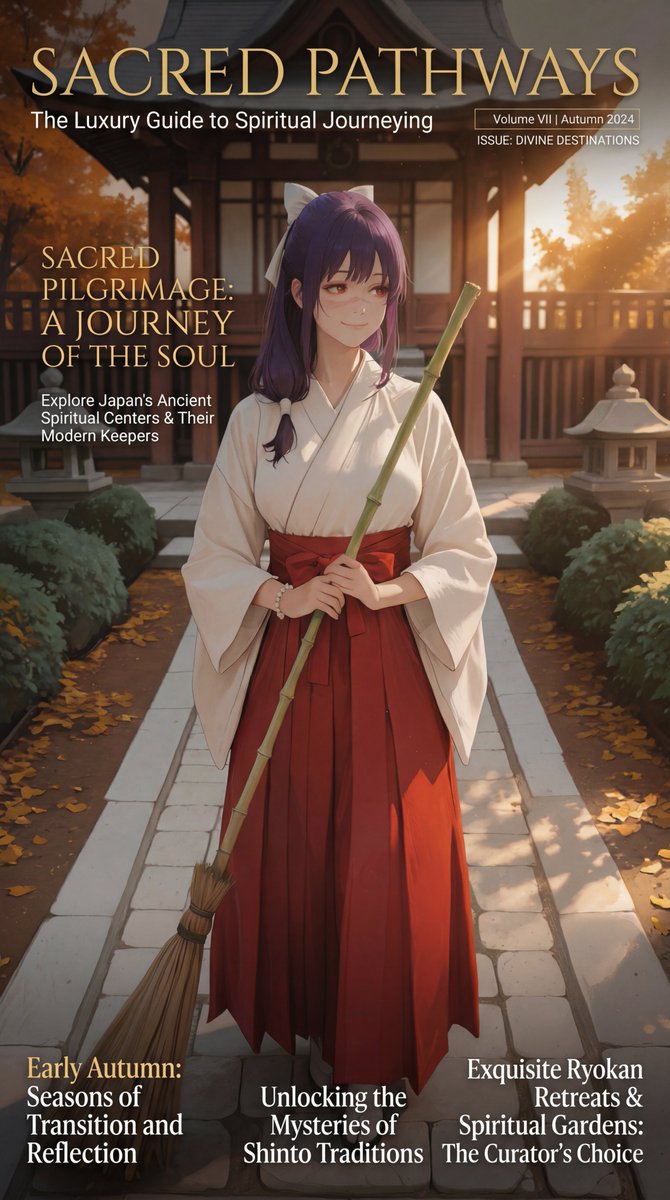
A Japanese prompt for generating a luxury travel magazine layout focused on an early autumn pilgrimage theme, with the title and description of the feature article displayed prominently in English across the entire screen.
ラグジュアリーな旅雑誌。テーマは初秋の旅。特集:聖地巡礼。画面全体に特集記事のタイトルや説明を英語で。
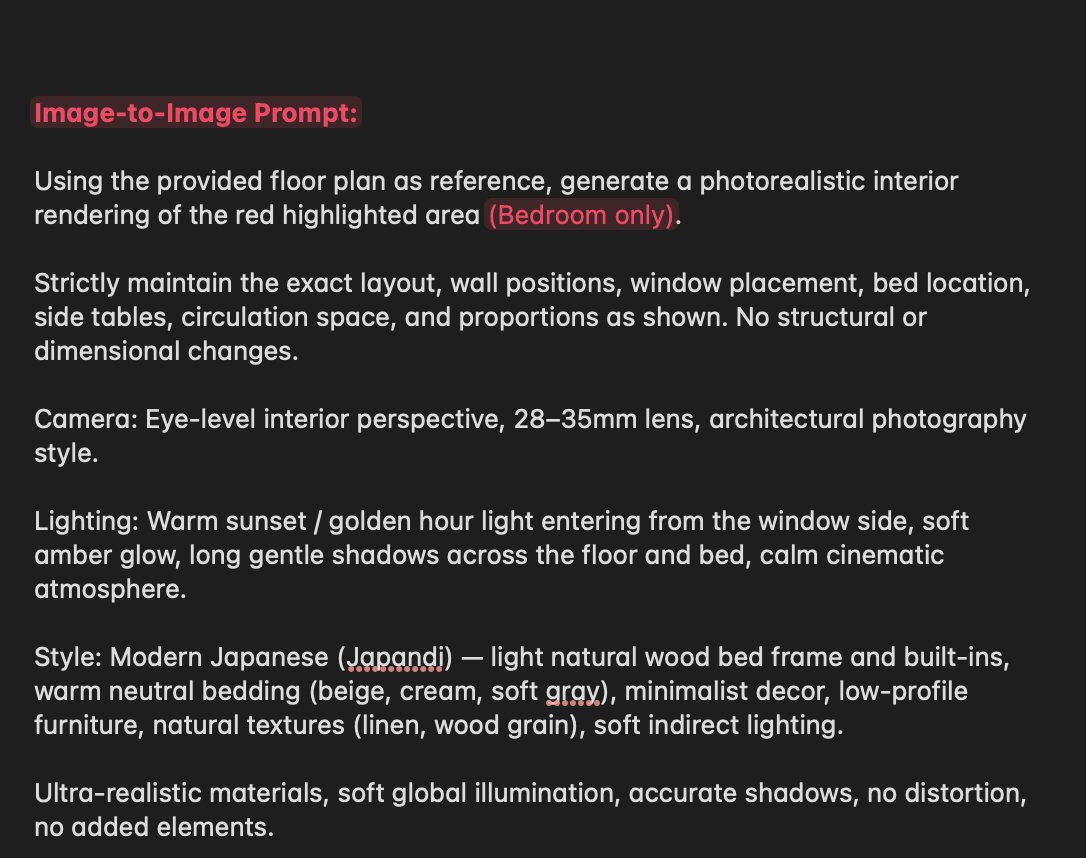
A prompt designed to ensure Nano Banana strictly maintains the exact structural layout, dimensions, and placement of elements (walls, doors, shelving, fixtures) when rendering a bedroom. This is a constraint-focused prompt for architectural rendering.
the prompt help nano banana strictly maintain the exact layout, wall positions, door swing, shelving placement, toilet and sink position, and dimensions as shown. No structural or proportional changes

An e-commerce oriented prompt that creates a full online shop page for a corset, including layout and design details.
create an image of this wireframe🧰 Part 1: Physical Single-Breadboard LayoutYou will place everything onto one single breadboard. This layout keeps your project clean and professional for your professor.The Microcontrollers: Plug your ESP32 Dev Board firmly across the center plastic divider trench on the right half of the board. Place your Arduino R3 right next to the left side of the breadboard.The Safe Power Rails (Top Edge of Board):Connect Arduino 5V Pin → Top Red Positive (+) Rail.Connect Arduino GND Pin → Top Black Negative (-) Rail.All sensors, the buzzer, the LCD screen, and the logic side of the relay module use these top rails.The Isolated Fan Power Rails (Bottom Edge of Board):Connect your AA Battery Pack Red wire → Bottom Red Positive (+) Rail.Connect your AA Battery Pack Black wire → Bottom Black Negative (-) Rail.Keep these bottom rails completely separate from the top rails to isolate the motor's power.🗺️ Part 2: Master Wireframe Wiring Manifest1. Components Mounted Directly in the Breadboard Grid HolesESP32 Dev Board: Pushed into the right side grid rows, straddling the center ditch.Buzzer (Active or Passive): Push its legs straight into two empty grid holes.Purple Wire: Long Positive (+) leg row → Arduino Digital Pin 3.Black Wire: Short Negative (-) leg row → Top Black Negative Rail.2. Loose Modules Connected via Female-to-Male (F-M) Jumper WiresSlip the Female sockets onto the module pins, and plug the Male pins directly into these destinations:DHT11 Temperature & Humidity Sensor:VCC wire → Top Red Positive RailGND wire → Top Black Negative RailDATA wire → Arduino Analog Pin A0Water Level Detection Sensor Module:VCC (+) wire → Top Red Positive RailGND (-) wire → Top Black Negative RailSignal (S) wire → Arduino Analog Pin A1LCD1602 Screen Panel (I2C Backpack Pins):VCC wire → Top Red Positive RailGND wire → Top Black Negative RailSDA wire → Arduino Analog Pin A4SCL wire → Arduino Analog Pin A5Real-Life 5V Relay Module (3 Logic Input Pins):VCC wire → Top Red Positive RailGND wire → Top Black Negative RailIN wire → Arduino Digital Pin 43. High-Current Fan Wiring (Screw Terminal Side of Relay Module)Stick the bare wires into the open plastic blocks and tighten the screws firmly:Red Wire: From the Bottom Red Positive Rail (AA Batteries) → Relay Module COM (Common) screw terminal.Red Wire: From the Relay Module NO (Normally Open) screw terminal → Red positive wire of your 3V DC Motor.Black Wire: From the Black negative wire of your 3V DC Motor → Bottom Black Negative Rail.4. The Microcontroller Communication Data BridgeGreen Wire: Connect Arduino Digital Pin 2 → the breadboard column matching ESP32 GPIO Pin 16 (RX2).Black Wire: Connect any GND Pin on your ESP32 → Top Black Negative Rail.

A prompt designed to test the AI's ability to handle ultra-minimalist composition. It focuses on perfect alignment, large areas of negative space, and a single abstract element, using only neutral tones and soft ambient lighting to create a deliberate and confident design.

A prompt designed to ensure Nano Banana strictly maintains the exact structural layout, dimensions, and placement of elements (walls, doors, shelving, fixtures) when rendering a bedroom. This is a constraint-focused prompt for architectural rendering.

A Japanese prompt for generating a luxury travel magazine layout focused on an early autumn pilgrimage theme, with the title and description of the feature article displayed prominently in English across the entire screen.
Opinionated conventions for building maintainable Next.js App Router applications.
# Next.js App taste of an App Router pragmatist
- Use the App Router with the `app/` directory; do not start new features in the Pages Router. Confidence: 0.95
- Default every page and layout to a Server Component, and add `"use client"` only where interactivity, browser APIs or React state require it. Confidence: 0.95
- Colocate route files as `page.tsx`, `layout.tsx`, `loading.tsx`, `error.tsx` and `not-found.tsx` next to the segment they own. Confidence: 0.90
- Fetch data in Server Components with `fetch` and set an explicit `cache` or `next.revalidate` policy; never leave caching accidental. Confidence: 0.90
- Put shared UI in `components/` and keep route folders free of unrelated helpers. Confidence: 0.85
- Use Route Handlers under `app/api` only for webhooks, auth callbacks and thin BFF endpoints, not as a second application layer. Confidence: 0.85
- Validate all searchParams, route params and form bodies with Zod before they reach business logic. Confidence: 0.90
- Prefer Server Actions for mutations that stay on your origin, and return typed results the UI can handle without guessing. Confidence: 0.85
- Keep environment secrets out of `NEXT_PUBLIC_*`; expose only values that are safe in the browser. Confidence: 0.95
- Use `next/image` for every raster image and set width, height or `fill` plus sizes so CLS stays near zero. Confidence: 0.90
- Configure absolute imports with `@/` in `tsconfig.json` and ban deep relative paths like `../../../`. Confidence: 0.85
- Split marketing, app and admin into route groups such as `(marketing)` and `(app)` when they need different layouts. Confidence: 0.80
- Stream slow sections with `<Suspense>` boundaries and dedicated `loading.tsx` files instead of blocking the whole page. Confidence: 0.85
- Pin Node and package-manager versions in `package.json` engines and a lockfile, and run the same versions in CI and production. Confidence: 0.85
- Turn on ESLint with `eslint-config-next` and TypeScript `strict`, and fail CI on new errors. Confidence: 0.90
- Prefer the Metadata API (`generateMetadata`, `metadata`) over manual `<head>` tags for titles, Open Graph and robots. Confidence: 0.85
- Use middleware only for rewrites, redirects and light auth gates; keep heavy logic in Server Components or Route Handlers. Confidence: 0.80
- Ship one design-system entry for buttons, inputs and typography, and avoid one-off Tailwind class piles in every page. Confidence: 0.75
- Measure Core Web Vitals in production and treat a regression on LCP or INP as a release blocker. Confidence: 0.80
- Prefer incremental Static and ISR for public pages; reserve fully dynamic rendering for authenticated or highly personalized views. Confidence: 0.85

A detailed prompt for generating a glamorous 1:1 editorial image for a luxury watch brand, utilizing an irregular grid layout (1 large hero image + 2 supporting images). It specifies the composition, background colors, product details (chrome silver watch), typography, and camera settings (Hasselblad X2D).

A prompt designed to generate a complete Japanese manga page with a dynamic and varied panel layout, specifying six panels of different sizes and shapes to create visual tension and movement, set in a Sapporo winter cityscape, using ultra-thin linework and screentone shading.

A detailed prompt for generating a fashion scrapbook or collage page layout using the Nano Banana Pro model within the Lovart tool. The prompt specifies composition, subject details, decorative elements like clips and tape, background, and technical rendering styles, aiming for a tactile, editorial look.
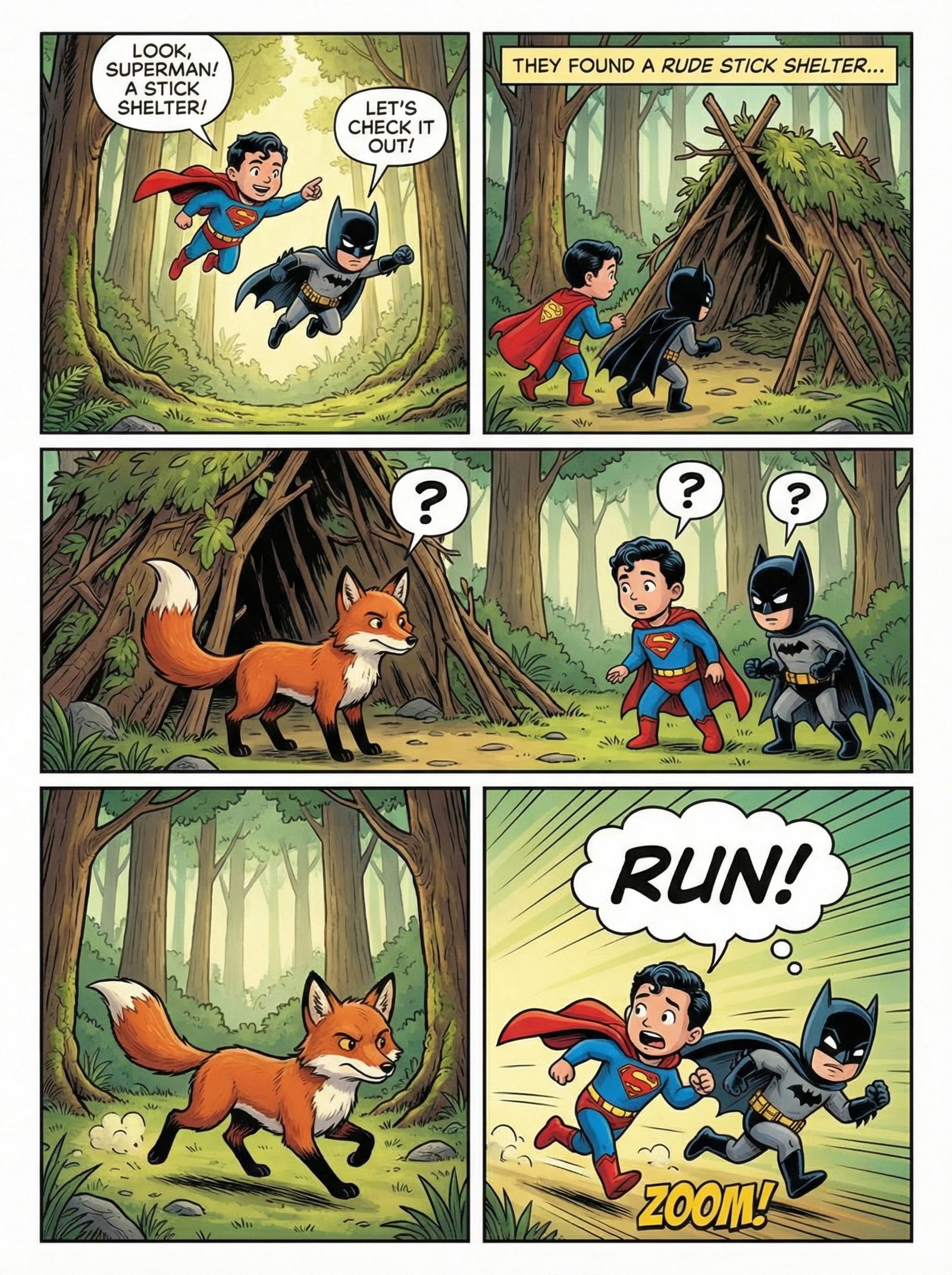
Your story as a blockbuster comic page.
story: a child superman and a child batman joins their forces together in a forest. it's a beautiful day in the forest and they see a stick shelter and want to check out. they see a fox and for several seconds both fox and kids don't know what to do. they think first. then they all decide to run in opposite directionsinstructions: {+185 more lines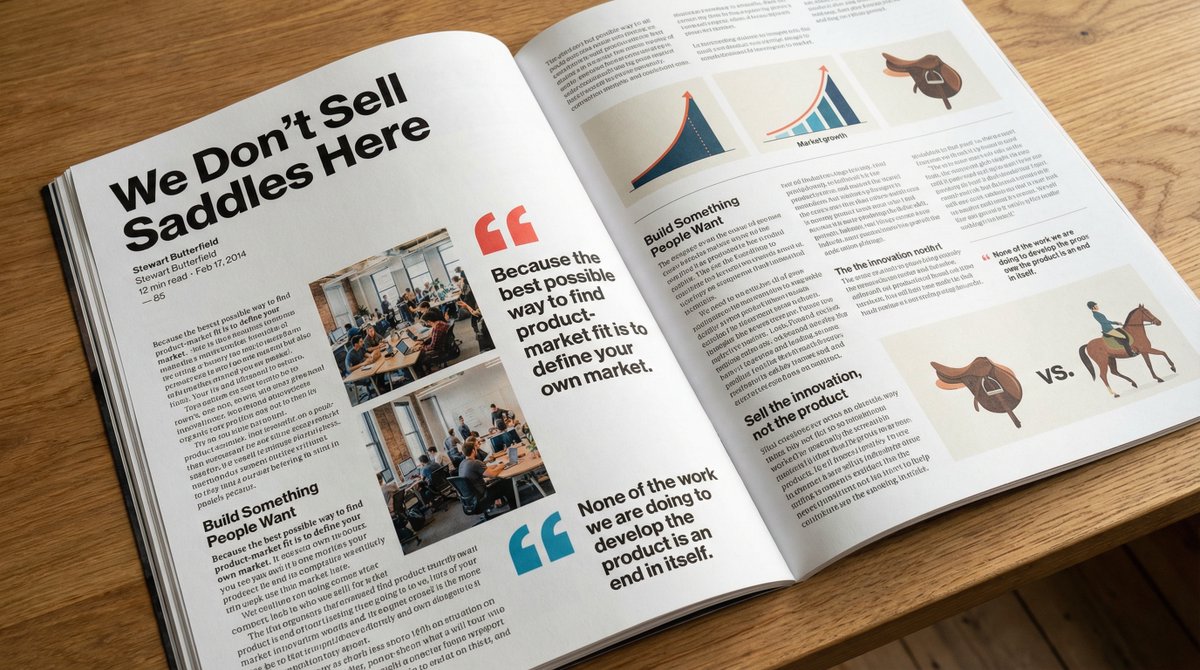
Two related prompts: one in English and one in Chinese, both asking to place a full article text into a photo of a glossy magazine on a desk with rich typography, photos, and some article themes turned into desk objects.
Put this whole text, verbatim, into a photo of a glossy magazine article on a desk, with photos, beautiful typography design, pull quotes and brave formatting. The text: [...the unformatted article]

请将这段文字原封不动地复制到一张精美杂志文章的照片中,照片需包含图片、漂亮的排版设计、精选语录和大胆的格式。
杂志摆放在一个高雅的书桌上,其中文章里的部分主体也会成为书桌上的一些摆件
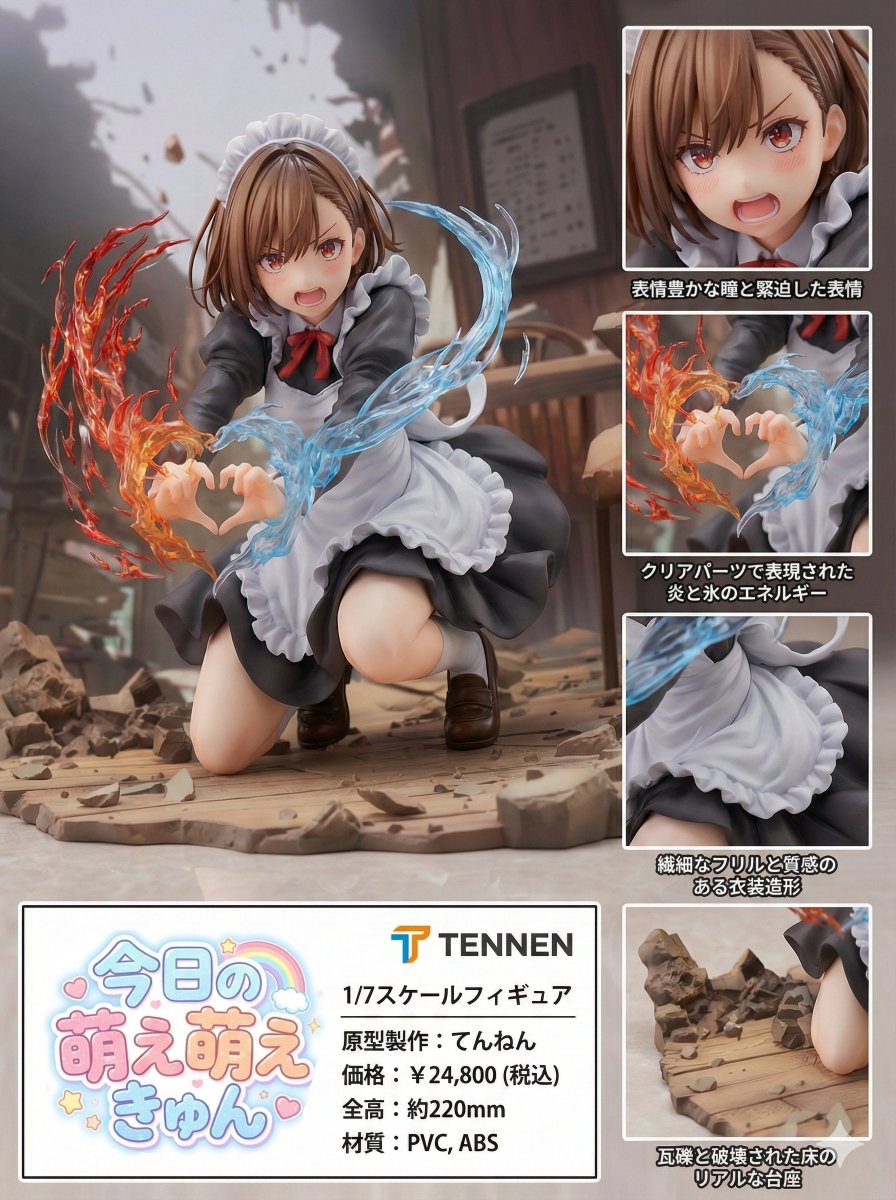
This is a comprehensive prompt designed for Nano Banana Pro to generate a photorealistic product introduction layout for a PVC figure based on a reference image. It includes detailed specifications for the figure's design, composition (vertical 3:4 aspect ratio with a main visual and product information area), action (static pose), location (neutral studio environment), style (photorealistic rendering), lighting (studio lighting with glossy/matte finishes), and exact Japanese text elements for product name, manufacturer, scale, price, size, and material, including multiple inset close-up panels highlighting different features.
product_name: "{ARBITRARY_PRODUCT_NAME}"
manufacturer_name: "{ARBITRARY_MANUFACTURER_NAME}"

subject: >
  The character from reference image A, faithfully preserved in design, proportions,
  facial features, hairstyle, outfit details, and color palette.
  The character is transformed into a highly detailed, photorealistic PVC figure.
  Sculpting style and overall aesthetic are inferred directly from the reference image.
  The figure is presented as a 1/7 scale collectible.

composition: >
  Japanese-language product introduction layout inferred by the model.
  Vertical composition with a 3:4 aspect ratio.
  A large main visual of the full figure.
  A single, clearly defined product information area containing all textual elements.
  Product name logo and manufacturer name logo are each displayed exactly once.
  Multiple inset close-up panels are included.
  Each inset must focus on a different physical area or feature of the figure.
  No two inset panels may depict the same part or the same visual characteristic.
  Inset panels must be visually and conceptually distinct from one another.

action: >
  Static collectible figure pose with no movement.
  Emphasis on sculpt accuracy, pr
A Japanese tweet discussing the 'Figure Conversion + Product Introduction Layout Prompt' (Prompt 13 from the festival list) and its multilingual capability (Japanese, English, German, French). The user notes that the prompt allows for the insertion of catchphrases.
Nano Banana Proで遊ぼう
【フィギュア製品紹介風
 レイアウトプロンプト 多言語対応版】
It asks an AI to assume the persona of a Senior Frontend Engineer & Product Reviewer to perform a high-level critique of a Next.js (App Router) project. Instead of writing code, the prompt focuses on evaluating the architecture (folder structure, scalability), UI/UX (hierarchy, consistency), and design system (component reuse) of a developer community platform to identify anti-patterns and suggest high-impact improvements.
Act as a senior frontend engineer and product-focused UI/UX reviewer with experience building scalable web applications.

Your task is NOT to write code yet.

First, carefully analyze the project based on:

1. Folder structure (Next.js App Router architecture, route groups, component organization)
2. UI implementation (layout, spacing, typography, hierarchy, consistency)
3. Component reuse and design system consistency
4. Separation of concerns (layout vs pages vs components)
5. Scalability and maintainability of the current structure

Context:
This is a modern Next.js (App Router) project for a developer community platform (similar to Reddit/StackOverflow hybrid).

Instructions:

* Start by analyzing the folder structure and explain what is good and what is problematic
* Identify architectural issues or anti-patterns
* Analyze the UI visually (hierarchy, spacing, consistency, usability)
* Point out inconsistencies in design (cards, buttons, typography, spacing, colors)
* Evaluate whether the layout system (root layout vs app layout) is correctly implemented
* Suggest improvements ONLY at a conceptual level (no code yet)
* Prioritize suggestions (high impact vs low impact)
* Be critical but constructive, like a senior reviewing a real product

Output format:

1. Overall assessment (brief)
2. Folder structure review
3. UI/UX review
4. Design system issues
5. Top 5 high-impact improvements

Do NOT generate code yet.
Focus only on analysis and recommendations.
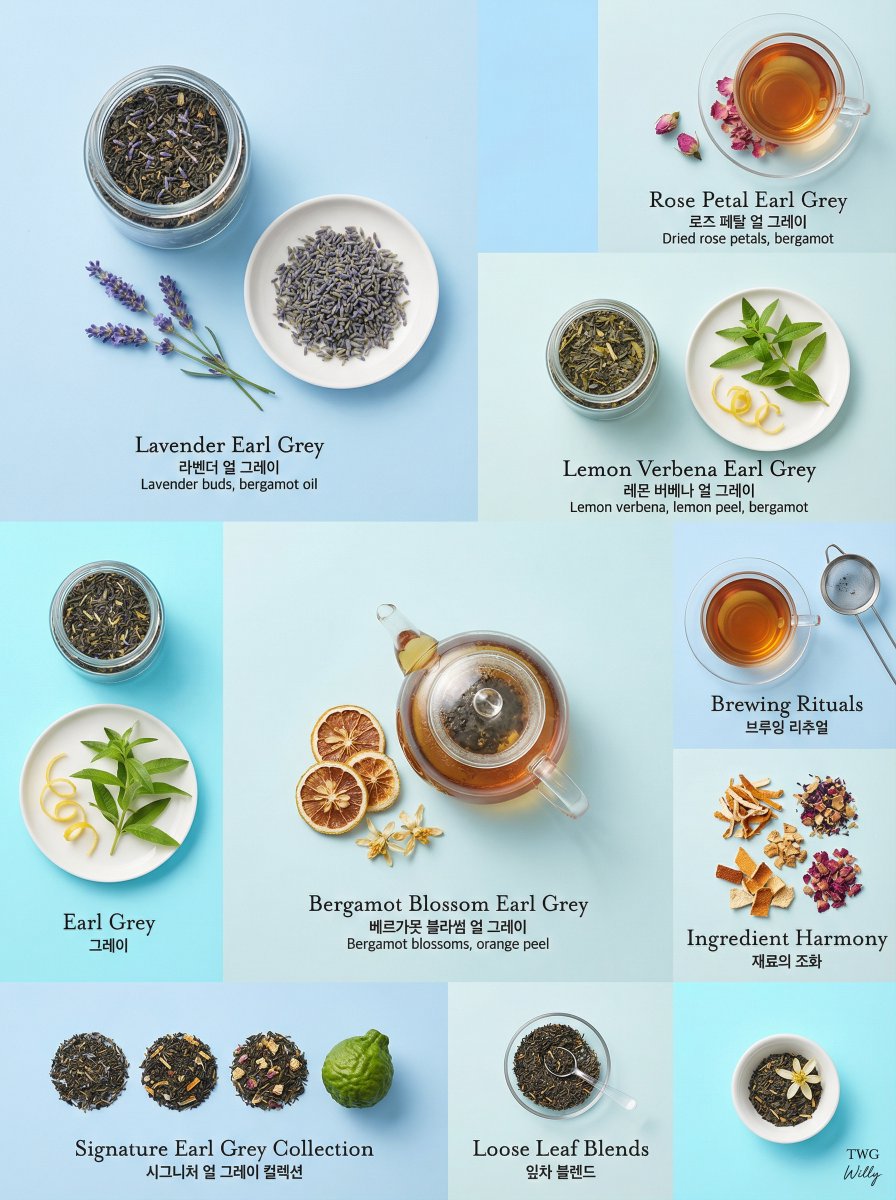
A detailed prompt for generating a luxury editorial photograph of an Earl Grey tea collection using an asymmetrical bento grid composition. It specifies a tone-on-tone color strategy with powder blue and azure, focusing on product-only presentation, bilingual typography, and soft diffused lighting for a quiet luxury aesthetic.
Special Layout Template make by Willy.

Aromatic Earl Grey tea collection, asymmetrical bento grid composition, 4:5 aspect ratio.
LAYOUT: 3x3 asymmetrical bento grid, unique cell sizes, refined editorial arrangement
BACKGROUND: Tone-on-tone panels - alternating soft {argument name="background color 1" default="powder blue (#B0E2FF)"}, pale sky (#CFECEC), light azure (#7DF9FF), creating subtle tonal rhythm
PRODUCT EXPRESSION: Product only, overhead and eye-level angles mixed, elegant presentation on white/cream ceramics
TONE STRATEGY: Tone-on-tone - tea and ingredient colors harmonize with background tones, seamless blend
MAIN ELEMENTS: Individual tea blends and ingredients - {argument name="tea blend 1" default="Lavender Earl Grey"}, Rose Petal Earl Grey, Lemon Verbena Earl Grey, Bergamot Blossom Earl Grey, each in matching glass containers and accompanying fresh ingredients on clean plates, consistent soft diffused overhead lighting
TYPOGRAPHY: Bilingual - English names in elegant light serif (Mrs Eaves), English/Korean below in clean sans-serif, small ingredient descriptions in light gray
CAMERA: Canon EOS R5, 100mm Macro for details, 50mm for full displays, soft diffused overhea
A structured prompt designed to generate a luxury brand 'About Page' visual narrative in a 4:5 ratio. It specifies a multi-section layout alternating between images and text blocks, focusing on a high-fashion Parisian aesthetic, glass skin effect, and editorial quality.
Special Layout Template make by Willy.

Luxury brand about page, storytelling layout, 4:5 ratio.

PAGE TYPE: About page - brand story, visual narrative
LAYOUT: Large image sections alternating with text blocks, timeline arrangement.

SECTION 1:
- Image: A young Caucasian woman in her early 20s : almond-shaped eyes with long defined lashes, high cheekbones, and a subtle V-line jaw. She has  long flowing wavy light brown hair with soft black-coffee highlights cascading over her shoulders. Luminous dewy porcelain skin with a healthy glow and glass skin effect, soft rose blush on cheeks, glossy cherry lips with a subtle smile, slim straight nose, delicate feminine features.
- She wears a cream silk power suit with clean lines and wide-leg trousers, paired with a delicate layered silver necklace. A designer clutch rests on the marble cafe table beside a steaming cup of matcha latte.

SECTION 2:
- Text Block: "{argument name="Text Block 1" default="Our Journey: A fusion of heritage and innovation, crafted for the modern woman."}"
SECTION 3:
- Image: Close-up beauty shot showcasing the glass skin effect and delicate jewelry.
SECTION 4:
- Text Block: "{argument name="Text Block 2" default=
A complex, highly parameterized prompt template designed to generate a fashion editorial image styled as a detailed, layered scrapbook or collage page, including placeholders for character description, thematic keywords, specific polaroid inserts, and decorative elements.
Masterpiece, best quality, high resolution, (FULL BODY SHOT:1.5), fashion scrapbook page layout, collage style, {argument name="aesthetic keywords" default="vintage punk / high-fashion"}

[Subject]: A wide shot full body fashion photo of {argument name="character description" default="a model with bright pink hair"}. [Pose & Action]. Wearing [Detailed Outfit], [Accessories], (shoes visible:1.3), complete figure from head to toe.

[Composition]: The image is designed like a [Layout Metaphor: DIY zine / field dossier / moodboard], main character in center, surrounded by (3 distinct polaroid snapshots:1.3) showing DIFFERENT [Thematic] details: (one close-up of [Face/Makeup Detail]:1.2), (one macro shot of [Fabric/Texture/Weapon Detail]:1.2), and (one detail of [Footwear/Accessory Detail]:1.2), ensuring unique and non-repeating insert photos.

[Decorations]: [Style] scrapbooking elements, [Clip Type: Silver clips / Gold clips / Rusted clips] holding a [Paper Stack Thickness] of papers together, pieces of [Tape Type: Washi / Duct / Masking] tape, hand-drawn [Doodle Type: arrows / stars / graffiti], handwritten text annotations in [Ink Type] (e.g., "[Short Text 1]", "[Short Text 2]"), [S
Analyze a minimalist editorial beauty board featuring an East Asian model. Examine front-facing, barefaced portraits and mirror selfies with makeup. Identify facial features, makeup styles, and fashion elements in a professional magazine layout.
{ "prompt": "A minimalist editorial beauty analysis board featuring an East Asian female model with a slim oval face and soft V-line jaw. Neutral gray background, clean studio lighting, high realism.\n\nTop section: front-facing barefaced portrait, natural skin texture, no makeup, hair pulled back, neutral expression. A thin blue outline tracing the face shape.\n\nRight side graphic text layout titled 'FACE' with small bullet points describing facial features: slim oval face shape, high cheekbones, soft jawline, small chin, refined nose bridge.\n\nMiddle section: two studio portraits labeled 'barefaced', one straight-on view and one three-quarter profile, minimal styling, soft lighting.\n\nBottom section: two mirror selfie style images labeled 'with makeup', glossy skin, soft glam makeup, blush-heavy cheeks, nude glossy lips, subtle eyeliner, voluminous layered hair, modern fashion styling.\n\nFashion magazine editorial layout, clean typography, balanced spacing, muted tones, professional beauty photography, high resolution, realistic skin details.", "negative_prompt": "exaggerated makeup, heavy contour, harsh shadows, cartoon style, anime, distorted face, low resolution, oversaturated colors, messy layout, watermark, logo, text artifacts, duplicated faces, extra limbs",+5 more lines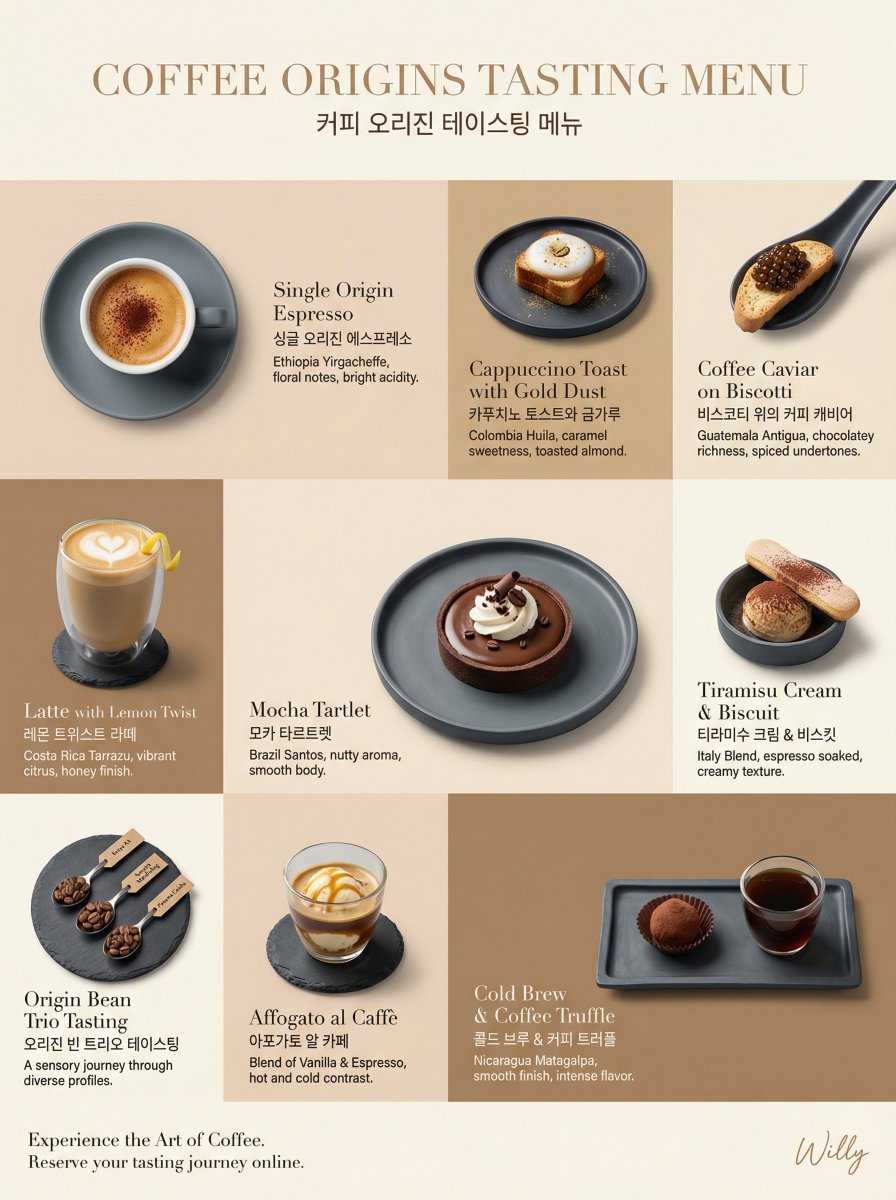
A highly structured prompt for generating a luxury, minimalist, tone-on-tone coffee tasting menu layout for a webpage, specifying the grid composition, color palette, product presentation, typography, and camera details.
Luxury coffee tasting menu layout, irregular grid composition, 9:16 aspect ratio for webpage.
LAYOUT: Irregular 3x3 grid, varied cell sizes, flowing editorial arrangement
BACKGROUND: Tone-on-tone panels - alternating {argument name="color 1" default="latte beige (#F2E2D2)"}, {argument name="color 2" default="mocha brown (#D1B48F)"}, and coffee cream (#FAF5E6) creating a subtle caffeinated rhythm
PRODUCT EXPRESSION: Product only, overhead and 45-degree angles mixed, plated presentation on minimalist slate ceramics
TONE STRATEGY: Tone-on-tone - coffee colors harmonize with background tones, an ethereal blend
MAIN ELEMENTS: Individual coffee tastings - Espresso with crema foam, Cappuccino toast with gold dust, Caviar on blinis substituted with coffee caviar on biscotti, Latte with lemon twist, Mocha tartlet, each on matching plates, consistent soft lighting
TYPOGRAPHY: Bilingual - English names in elegant light serif (Didot), English/Korean below in clean sans-serif, small origin descriptions in light gray
CAMERA: Canon EOS R5, 100mm Macro for details, 50mm for full plates, soft diffused overhead lighting, side rim lighting
STYLE: Minimal + Luxury hybrid - generous whitespace, refined
A prompt used with Google Nano Banana to create an image layout of a modern villa, including sketchy analysis renders.
Create an image layout of a modern villa with sketchy analysis renders

Two related prompts: one in English and one in Chinese, both asking to place a full article text into a photo of a glossy magazine on a desk with rich typography, photos, and some article themes turned into desk objects.
Game Concept: An educational game where students link historical events (Chronos) using "Energy Threads." It uses a force-directed layout to keep event bubbles floating naturally in a 3D space.
Game Concept: An educational game where students link historical events (Chronos) using "Energy Threads." It uses a force-directed layout to keep event bubbles floating naturally in a 3D space.
Technical Prompt:
Create a link-based puzzle. Use a force-simulation logic to prevent bubble overlapping. When two correct bubbles are clicked, draw a CatmullRomCurve3 between them with a glowing neon texture.

This is a comprehensive prompt designed for Nano Banana Pro to generate a photorealistic product introduction layout for a PVC figure based on a reference image. It includes detailed specifications for the figure's design, composition (vertical 3:4 aspect ratio with a main visual and product information area), action (static pose), location (neutral studio environment), style (photorealistic rendering), lighting (studio lighting with glossy/matte finishes), and exact Japanese text elements for product name, manufacturer, scale, price, size, and material, including multiple inset close-up panels highlighting different features.

A Japanese tweet discussing the 'Figure Conversion + Product Introduction Layout Prompt' (Prompt 13 from the festival list) and its multilingual capability (Japanese, English, German, French). The user notes that the prompt allows for the insertion of catchphrases.

A detailed prompt for generating a luxury editorial photograph of an Earl Grey tea collection using an asymmetrical bento grid composition. It specifies a tone-on-tone color strategy with powder blue and azure, focusing on product-only presentation, bilingual typography, and soft diffused lighting for a quiet luxury aesthetic.

A structured prompt designed to generate a luxury brand 'About Page' visual narrative in a 4:5 ratio. It specifies a multi-section layout alternating between images and text blocks, focusing on a high-fashion Parisian aesthetic, glass skin effect, and editorial quality.

A highly structured prompt for generating a luxury, minimalist, tone-on-tone coffee tasting menu layout for a webpage, specifying the grid composition, color palette, product presentation, typography, and camera details.
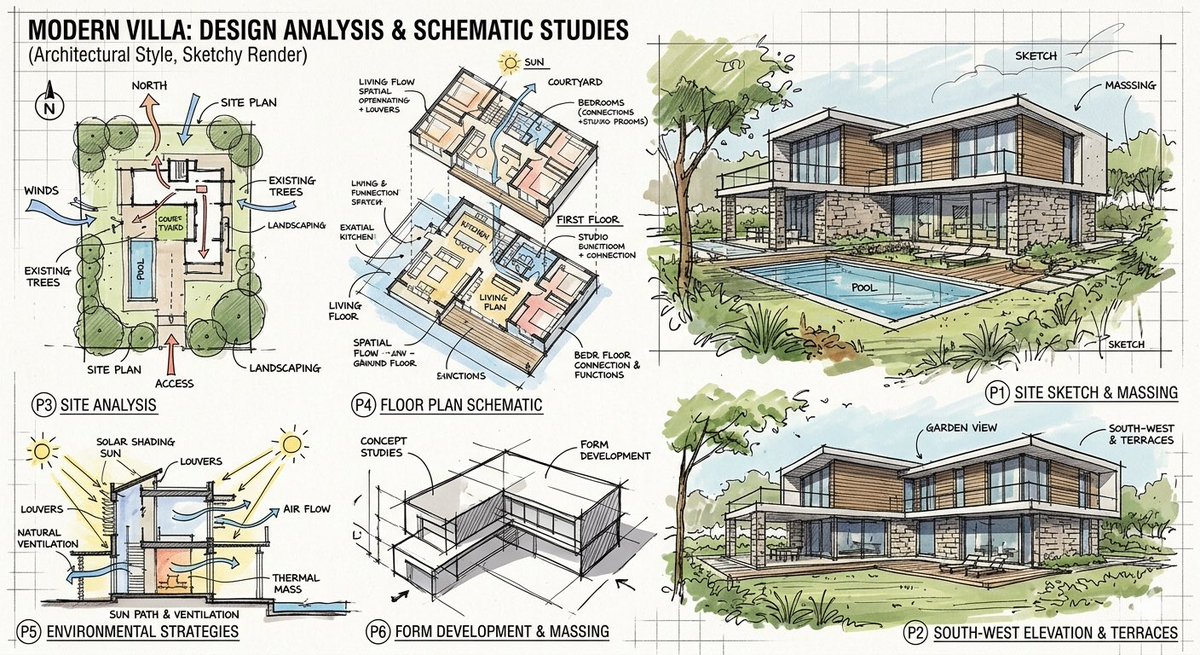
A prompt used with Google Nano Banana to create an image layout of a modern villa, including sketchy analysis renders.

A complex, highly parameterized prompt template designed to generate a fashion editorial image styled as a detailed, layered scrapbook or collage page, including placeholders for character description, thematic keywords, specific polaroid inserts, and decorative elements.
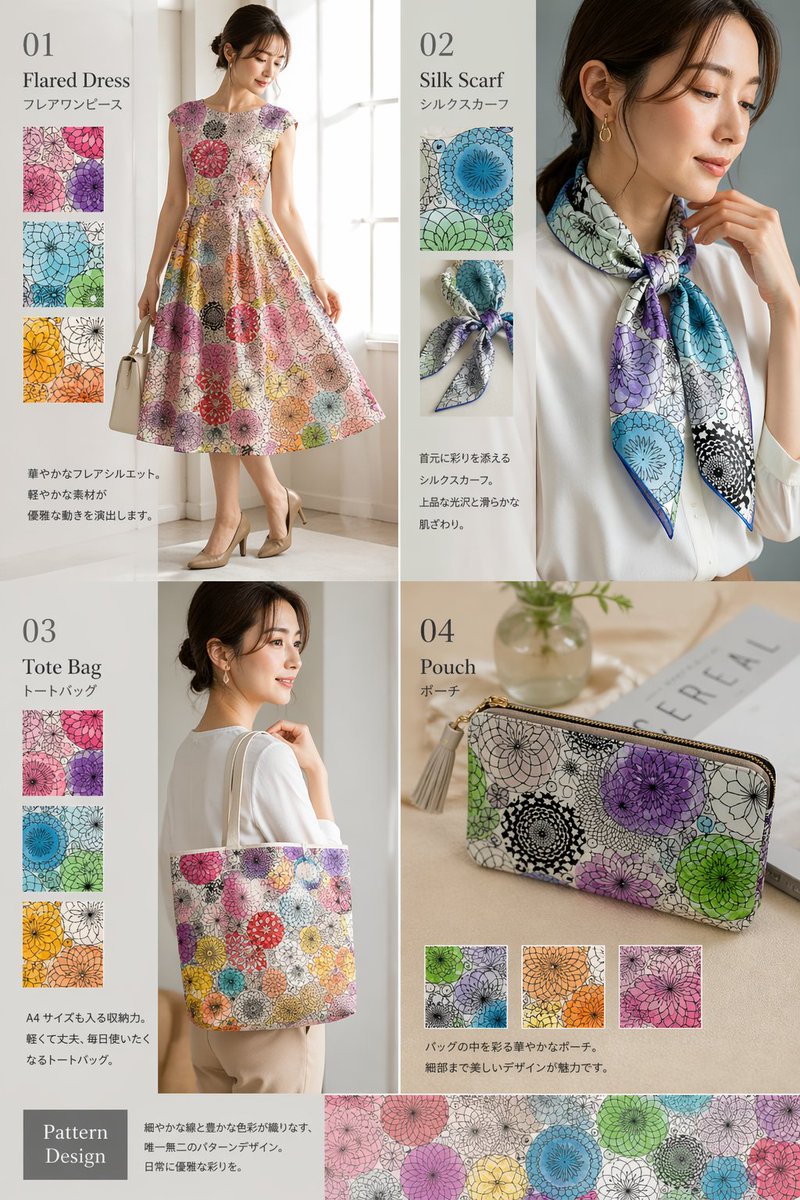
Generates a multi-panel fashion catalog showcasing different products featuring a unified pattern design.
{
  "type": "fashion product catalog layout",
  "theme": "A cohesive fashion collection featuring a specific pattern: {argument name=\"pattern description\" default=\"overlapping circular floral mandala motifs in purple, green, blue, orange, and pink\"}",
  "layout": {
    "structure": "2x2 grid with a full-width bottom banner",
    "sections": [
      {
        "id": "01",
        "title": "{argument name=\"product 1\" default=\"Flared Dress\"}",
        "subtitle": "フレアワンピース",
        "main_image": "Woman in patterned flared dress holding white handbag.",
        "swatch_count": 3,
        "swatch_descriptions": ["purple variant", "green/blue variant", "orange/yellow variant"],
        "description_text": "華やかなフレアシルエット。軽やかな素材が優雅な動きを演出します。"
      },
      {
        "id": "02",
        "title": "{argument name=\"product 2\" default=\"Silk Scarf\"}",
        "subtitle": "シルクスカーフ",
        "main_image": "Woman in white blouse with patterned silk scarf.",
        "swatch_count": 2,
        "swatch_descriptions": ["flat pattern detail", "tied knot detail"],
        "description_text": "首元に彩りを添えるシルクスカーフ。上品な光沢と滑らかな肌ざわり。"
      },
      {
        "id": "03",
        "title": "{argument na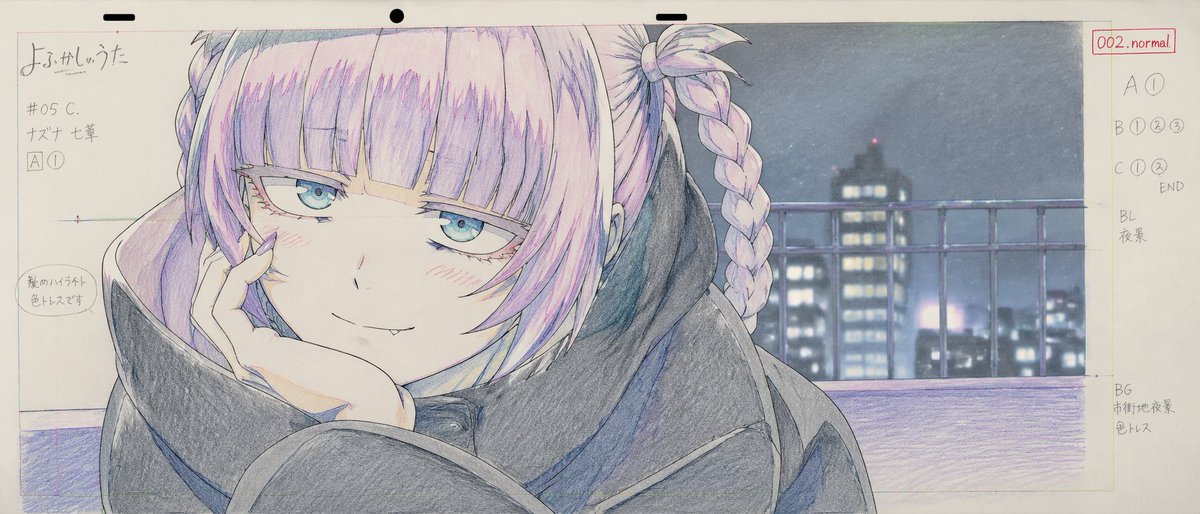
Generates a traditional anime key animation layout sheet with handwritten production notes and a colored character drawing.
{
  "type": "anime production layout sheet",
  "style": "traditional colored pencil genga, key animation drawing",
  "subject": {
    "character": "{argument name=\"character name\" default=\"ナズナ 七草\"}",
    "appearance": "anime girl with {argument name=\"hair color\" default=\"light purple\"} hair styled in twin braids and bangs, blue eyes, wearing a dark oversized coat",
    "pose_and_expression": "{argument name=\"expression\" default=\"smug with a small fang, resting chin on hand\"}"
  },
  "background": "{argument name=\"background scene\" default=\"nighttime city skyline with a railing\"}, soft focus",
  "layout": {
    "top_edge": "standard animation paper peg holes",
    "left_margin": {
      "series_title": "{argument name=\"anime title\" default=\"よふかしのうた\"}",
      "production_codes": ["#05 C.", "[A] (1)"],
      "circled_note": "髪のハイライト 色トレスです"
    },
    "right_margin": {
      "red_box": "002.normal",
      "timing_layers": ["A (1)", "B (1) (2) (3)", "C (1) (2) END"],
      "background_notes": ["BL 夜景", "BG 市街地夜景 色トレス"]
    }
  }
}A detailed storyboard prompt for a cooking sequence featuring mie goreng, styled for editorial food photography with technical annotations.
Create a vertical 4:5 cooking storyboard with exactly 10 panels in a {argument name="grid" default="2×5 grid"}. {argument name="surface" default="warm wooden tabletop"}, perfect top-down view, thin white borders, dusty-pink rounded headers, cream caption boxes, numbered circles and black handwritten typography.\n\nShow the exact sequence: {argument name="dish" default="dish"} packet → packet opens → noodles enter silver pot → noodles boil → seasoning sachets come out → cooked noodles enter black bowl → seasonings fall in → noodles mix → fried egg placed on top → finished mie goreng with egg and garnishes.\n\nUse clear white curved arrows, motion lines and sparkles to show every movement. Keep identical object continuity, realistic food, warm lighting, clean cute editorial storyboard style, sharp details and balanced spacing. No people, no hands, no extra panels.
This prompt takes a long article text and renders it as a styled glossy magazine article on a desk with photos and modern typography.
Put this whole text, verbatim, into a photo of a glossy magazine article on a desk, with photos, beautiful typography design, pull quotes and brave formatting. The text: {argument name="article_text" default="[paste the full unformatted article here]"}
A detailed prompt for Gemini Nano Banana Pro to generate an editorial layout for a luxury Korean tasting menu. The prompt specifies a 2x2 grid composition, a monochrome color strategy (crimson, ochre, celadon) harmonizing with the dishes, and detailed descriptions of four main Korean dishes, aiming for a 'Minimal + Luxury hybrid' style shot by Annie Leibovitz.
Luxury Korean tasting menu, editorial layout, 2+2 large grid composition, 4:5 aspect ratio.

LAYOUT: 2x2 large grid, with two hero images on top and two supporting images below, balanced asymmetric arrangement

BACKGROUND: Tone-on-tone panels - alternating deep crimson (#800000), ochre (#CC7722), and celadon (#ACE1AF), creating warm yet appetizing rhythm

PRODUCT EXPRESSION: Product only, overhead and 45-degree angles mixed, plated presentation on artisanal black ceramics and traditional Korean wooden trays

TONE STRATEGY: Monochrome red/brown/green - Korean dish colors harmonize with background tones, seamless blend with pops of natural food color

MAIN ELEMENTS:
Hero Image 1 (top left): {argument name="hero dish 1" default="Bossam (boiled pork belly) plated with kimchi and ssamjang (fermented soybean paste)"}
Hero Image 2 (top right): {argument name="hero dish 2" default="Bibimbap (mixed rice with vegetables and beef) with gochujang (chili pepper paste), egg yolk, and sesame oil"}
Supporting Image 1 (bottom left): Galbijjim (braised short ribs) in a dark glossy sauce with chestnuts and ginko nuts
Supporting Image 2 (bottom right): Bingsu (shaved ice dessert) with red bean paste,